 MemDesk
The phone app
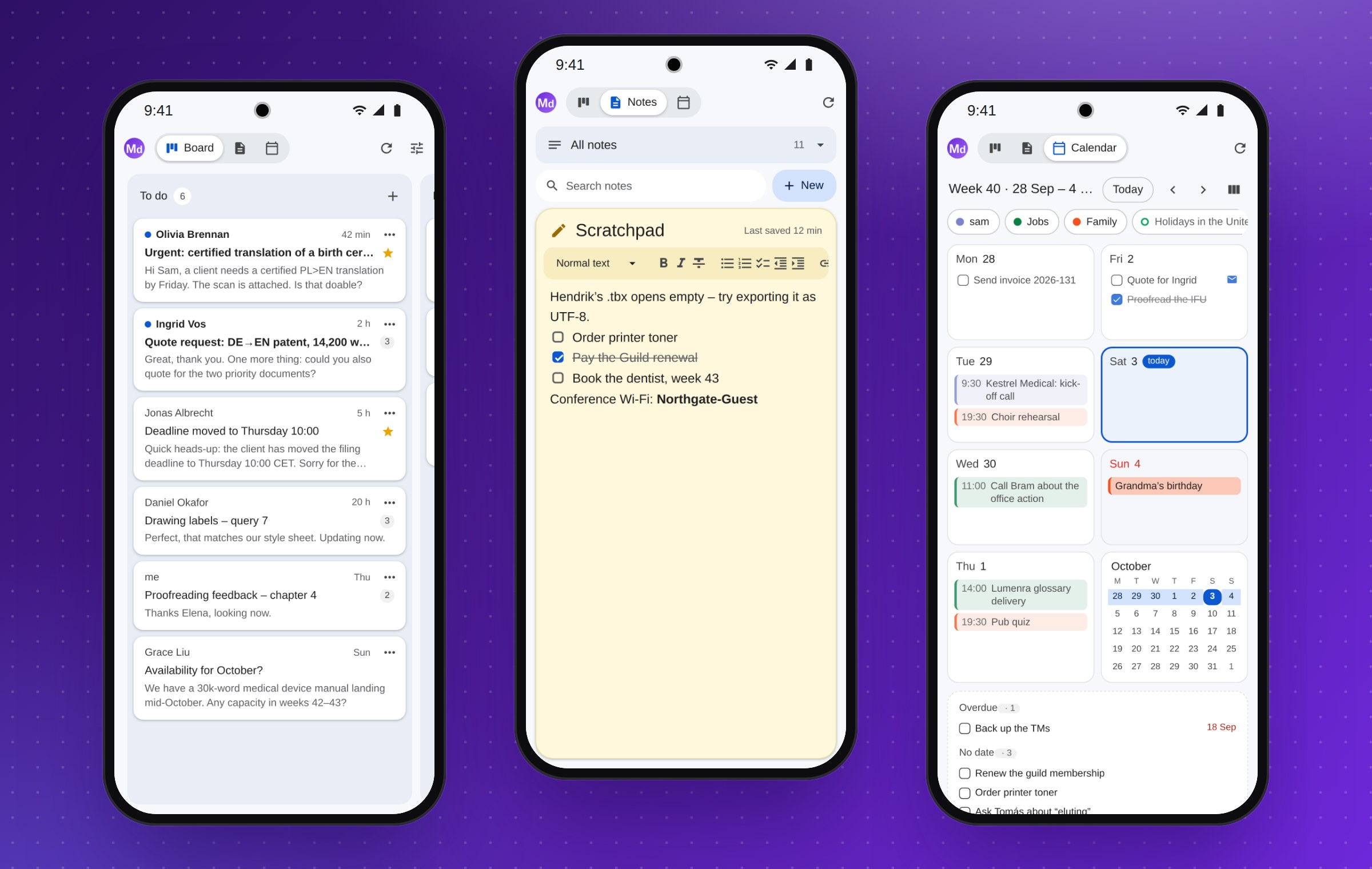
The phone app puts the board, the notes and the calendar on your phone's home screen. They are the same board, notes and calendar as in Chrome, laid out for a phone, and they work straight from your Gmail and Google Calendar.
Setting it up
If you were sent a link to the phone app:
- Open the link in Chrome on your phone, signed in to the same Google account as your Gmail.
- Google asks you to allow access, as on the computer. If it says it hasn't verified the app, tap Advanced, then Go to ….
- Your Scratchpad opens. To put the app on your home screen, tap ⋮, then Add to Home screen, then Add.
If you set up MemDesk yourself, the phone app runs from the same Apps Script project as the Gmail panel, so you make the panel first. The app is then one more step of about three minutes: SETUP.md, part 3. Its address ends in /dev, and only you can open it.
The notes
The app opens on your Scratchpad, ready to type, under the search box and New. It opens on the phone's own copy of the Scratchpad, so you can start typing before Gmail has even answered. If it was changed on your computer in the meantime, both changes are kept.
- Folders. The button above the search box says which folder you are in ("All notes"). Tap it and the folder tree opens, with each folder's ⋯ menu. Pick a folder and its notes take the Scratchpad's place. So does a search.
- A note opens full-screen when you tap it, with the same editor as in Chrome.
- Back. Android's back gesture, or the arrow at the top left of a note, goes from a note to its list, and from the list to the Scratchpad.
- Saving. A note saves a moment after you stop typing, and at once when you go back to the list or switch to another app.
- Search marks the words you searched for, in the results and in the open note, with arrows to step from one to the next.
See Notes for the editor, folders and search.
The board
One column fills the screen: swipe sideways for the next. The board opens as you last saw it on this phone, at once, and catches up with Gmail a moment later; Updating… at the top says it is still doing so. A card's ⋯ opens it in Gmail, moves it to another column, edits its title, note and colour, or takes it off the board. The + on a column finds an email and adds it, and the settings button changes the columns.
Tapping a card, or Open in Gmail, opens the email on Gmail's mobile site in Chrome. It can't open in the Gmail app: Android gives web pages no way to send the Gmail app to one email (see Questions).
The columns are the same as in Chrome: see The same columns everywhere.
The calendar
The week is two columns of days, Monday to Thursday and then Friday to Sunday, with the month as the eighth tile. Swipe sideways for the next or previous week.
- Tap a chip at the top to show or hide a calendar or task list.
- The button beside › changes which way the days run: down, then across, or across, then down.
- Tap an event or a task to change it, a task's box to tick it off, and the + on a day to add something. Dragging is for a computer: on a phone, change the day in the editor.
- The button at the end of the header (or the month's name in the eighth tile) shows the whole month, with a coloured line for each of the first few things on each day. Tap a day for its week, and swipe for the next or previous month.
The phone remembers what you chose. The calendar uses the app's own access to Google, so there is nothing to connect. The first time, it may ask you to Allow it: tap the button and allow it on Google's page.
On a computer
Opened on a computer, the app is the board, the notes and the calendar as in Gmail, in a browser tab of their own.